What’s Involved?

When purchasing an anilox roll, not having the right anilox roller specifications can cause real problems for you down the road. Simply understanding that an anilox is made up of thousands of microscopic ink-carrying cells is not enough. It is also necessary to have a basic understanding of the characteristics of the cells and their impact on ink transfer. The following information will help you avoid unnecessary problems caused by inaccurate anilox roller specifications when ordering.

What To Consider

There are three main cell characteristics important to understanding anilox roller specifications:

  1. The angle of the cells (60°, 45°, 30°, etc.)
  2. The carrying capacity of the cell (or cell volume)
  3. The number of cells per linear inch (or line screen)

Angle of the Cells

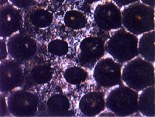
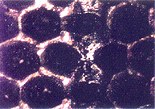
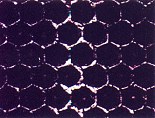
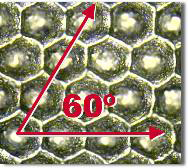
Other than random patterns, anilox cell angles can include the 60° hex pattern, the 30° hex pattern, and the 45° diamond pattern (as shown below).
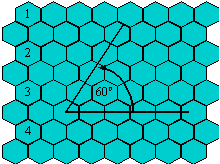
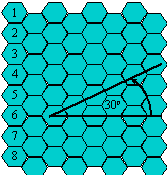
Anilox roller specification cell angle

Today, since its introduction by Harper in 1989, the 60° hex pattern is the world standard for flexo printing for these reasons:

  • The cells can be nested more tightly together, allowing for approximately 15% more cells in a given area.
  • The post areas are eliminated due to the placement of the cells during laser engraving.
  • The cells can be shallower while still releasing the same amount of ink because more cells fit into a square inch area.
  • Channeling is avoided (as compared to the 30°) because the straight side of the cell wall is not positioned horizontally.
  • This pattern is most easily reproducible from a manufacturing standpoint; therefore, you will see greater consistency from roll to roll.

45° and 30° patterns may be preferable in non-printing flexo applications (such as coatings, laminations, and specialty printing), but generally are not recommended for general flexo printing applications.

Anilox Roll Volume

The amount of ink that is transferred from a cell depends upon the carrying capacity of the cell or the cell’s volume. Remember, you print with a wet and fluid film of ink and it is important to keep in mind that you want to print with the thinnest ink film possible. Thinner films of wet ink are easier to control, reduce dot gain, and increase graphic capability.

As shown in the following graphic, dot gain is decreased with thinner ink films, simply because there is less ink to transfer from the printing plate dot.

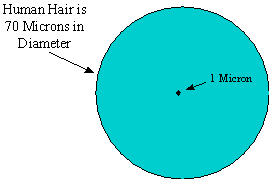
We are dealing with very small measurements and every micron is critical. How big is a micron?

A human hair is approximately 70 microns in diameter.
As stated before, you can use a lower volume anilox roll with a 60° cell because more cells fit into a square inch in this configuration. However, a cell with too small of a volume will cause ink to dry before it can be transferred unless there are sufficient drying inhibitors used. The goal is to specify an anilox roll that will deliver the color strength and densities needed with the thinnest ink film possible.

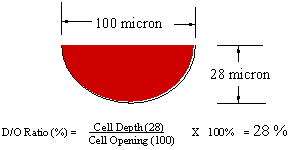
As a good rule of thumb, Harper recommends a cell whose depth is between 23% to 33% of the cell’s opening.

For example, if the opening of a cell is 100 microns, the depth of that cell should be between 23 and 33 microns.
Disadvantages of deep cells (>33% depth to opening ratio):

  • Ink will not release efficiently
  • Difficult to clean
  • Creates rough cell walls
  • Extremely difficult to make consistent and predictable engravings.

Example of deep cell (50% depth to opening ratio)

Anilox roller specification deep cells

Disadvantages of shallow cells (‹23% depth to opening ratio):

  • Creates rough cell cavity
  • Extremely difficult to make consistent with predictable engravings

Example of shallow cell (15% depth to opening ratio)

Anilox roller specification shallow cells

Advantages of bowl shaped cells (23% – 33% depth to opening ratio):

  • Uniform cell size and shape
  • Smooth glazed cell lining for efficient ink release
  • Shallow angle for easy ink release
  • Smooth, thin cell walls
  • Possible to make consistent and predictable engravings

Example of bowl-shaped cell (28% depth to opening ratio)

Anilox roller specification bowl shaped cells

Remember, when using a lower volume anilox roll, less ink is transferred to the substrate. That is a good thing. However, you still need to achieve acceptable densities from your inks.

This is the point where you must evaluate the ink you’re using. If you are not getting adequate color strength, you may need to re-think your current ink choice or talk to your ink supplier to see if they have a solution. Higher pigment inks are available and ink manufacturers have responded to the demand for these inks. Though they may cost a bit more in the beginning, improved graphics more than offset the cost. Also, because you are transferring less ink, handling less ink, and wasting less ink, you will purchase less ink.

Reduced VOC emissions are another benefit of using lower volume anilox rolls. It’s the same concept: less ink gives off less VOC emissions. It’s that simple.

Line Screen

Line screen (or the number of cells per linear inch) is the third major component to understand when specifying an anilox roll. Line screen is chosen in direct correlation to anilox volume.

For example, an anilox volume of 3.2 BCMs, requires a line screen of approximately 500. If an anilox volume of 3.2 BCM was engraved at 1000 line screen, cells would be much too deep. In correlation, a 3.2 BCM anilox at 120 line screen anilox would result in cells being much too shallow.

With increased ink strength and lower anilox volumes, higher line screen anilox rolls can now be used. These higher line screen rolls give printers the opportunity to reach for higher graphics with finer vignettes, line and type, and process work. Following is a rough outline of printing applications matched with appropriate line screens and cell volumes:

Application

Optimizing Research

After you understand the basic characteristics of these three, you must determine which combination of anilox cell pattern, volume and line screen will work for your application.

The best way to do this is through banded roll testing.

A banded roll contains actual bands of different line screen and volume combinations. This test helps determine the correct line screen and volume combination for printing the thinnest ink film possible and still delivering the color strength you need.

Again, knowledge of the characteristics of anilox cells and their impact on ink transfer is vital to your flexo reproduction capabilities.

In review, you need a basic understanding of:

  • The angle of the cells
  • The carrying capacity of the cell (or cell volume)
  • The number of cells per linear inch (or line screen)

By taking the time to understand these three important components of anilox roller specifications, you can increase your graphic capabilities and save time, money, and energy in the future.

Application Appropriate Anilox Line Screen Appropriate Anilox Volume
Heavy line and solids
Line and type
Vignettes
Process
180 – 330
200 – 400
360 – 500
500 – 1200
8 – 4 BCMs
7.5 – 3.5 BCMs
4.7 – 2.8 BCMs
3.2 – 1.0 BCMs

Is anilox scoring and damage becoming an expensive and frustrating problem? Take heart. Many printers have resolved the problem, and this article discusses how.

I. DEFINING AND IDENTIFYING ANILOX SCORE LINES

When a hard particle becomes trapped between the doctor blade and the anilox roll, the particle can ride there and effectively destroy rows of anilox cells. These rows of cells appear as thin bands running the circumference of an anilox and are commonly called score lines. There are two types of anilox scoring:

  1. Deep gouging score lines which show as dark streaks in the printed image.
  2. Light polishing score lines which are more common and show as light streaks in the printed image.

Fortunately, a few easy precautions can eliminate or at least minimize the problem.

Viewing Anilox Scoring Lines:

Figures 1 & 2: Deep Gouging Score Lines

Figure1

Anilox scoring and damage

Figure 2

Deep anilox scoring line

The two photos above show deep, gouging score lines. Notice the unharmed cells surrounding the damage. This type of score line is caused by large particles lodged between the contact tip of the doctor blade and the roll’s surface. The area damaged is always multiple cells wide and normally runs around the entire circumference of the roll.

This type of score line tends to cause a continuous dark streak in the printed graphic area.

Figure 3: Light Polishing Score Lines

light polishing anilox scoring lines

The photo at left shows light polishing score lines. Notice that the cell wall is the only area damaged. The “polished looking” surface of the land area is the light score line.

These score lines reduce ink delivery volume of the anilox just enough to show as a continuous, lighter line within a graphic.

Note: A continuous, lighter line within a graphic is not necessarily caused by scoring. A plugged group of cells in need of cleaning can also print a continuous, light line. In this case, particles of metal, dried ink, or the like, actually grind into the anilox roll cells filling them in. This causes loss of ink transfer or a light streak in the printed graphic.

II. THE PRIMARY CULPRIT FOR ANILOX SCORING: BLADE TIP SLIVERS

Large pieces of metal caused by improper doctor blade use are the primary cause of anilox scoring (Figure 4).

These large steel particles break off of doctor blades as they wear.

Figure 4

Improper Doctor Blade Use

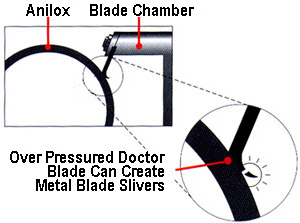
When installing new blades, the shorter, worn blade is replaced by a new longer blade. If the chamber is not readjusted for the new, longer blade, over pressure occurs when engaged with the anilox. Press crews also over pressure to get more color to the plate without changing anilox.

Normal blade shavings do not damage a roll because the micro-slivers of metal are too small to get lodged between the blade edge and anilox cell walls.

Figure 5: Incorrect Blade Pressure

incorrect doctor blade pressure causinf anilox scoring

When over pressured, the doctor blade bends back causing wear on the side rather than the tip (Figure 5, shown above). As the side of the blade wears through, the tip breaks away in the form of a long metal sliver.

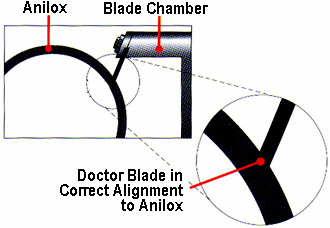
Ideally, only the very top of the doctor blade contacts the anilox as seen in the drawing below (Figure 6).

Figure 6: Correct Blade Pressure

When adjustment is correct, the best metering of ink, print quality and blade wear occurs. Over pressured blades from chamber alignment problems, operator error, trying to stop chamber leaking, rippled blades, or using blades for too long, create large slivers and pieces of metal which contaminate your ink system.

Viewing the Primary Culprit

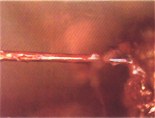
The photo below (Fig.7) shows metal, hair-like tips caused by over pressing doctor blades.

Figure 7: Blade Tip Slivers

The photo below shows blade tips taken from a filter magnet. (These can range from 1/32″ to several feet in length.)

Proper blade chamber alignment (both horizontal and vertical alignment in relationship to the anilox) and maintenance of the blade chamber (cleaning, proper seal setting and blade setting) are the first and best steps toward prevention of score lines.

The relationship of your printing plate dot to your anilox line screen cell directly affects the quality of your flexo print.

Keep in mind that when using a low line screen printing plate (such as 55) you will typically use a lower line screen anilox roll (such as 250 – 500). When using a high line screen printing plate (such as 150) you will typically use a higher line screen anilox roll (such as 600 – 1200). The following chart outlines proper anilox line count to printing plate dot relationships:

Anilox Line Count to Printing Plate Dot Chart

% Plate Dot
1% 2% 3% 4%
Plate Screen
(per inch)
Minimum Anilox Line Count
(per inch)
55 500 330 280 250
65 550 400 330 280
85 700 500 400 360
100 900 600 500 440
110 900 660 550 500
120 1000 700 600 500
133 1200 800 660 600
150 1200 900 700 600
175 N/A 1000 900 700
200 N/A 1200 900 800

For example, in imperial measurements, when you are using a 100 line screen plate and trying to hold a 2% dot, the chart above indicates that you will need a 600 line screen anilox roll. Whereas, if you’re using a 100 line screen plate, and you’re trying to hold a 4% dot, you’ll only need a 440 line screen anilox roll.

The Problem of Dot Dipping

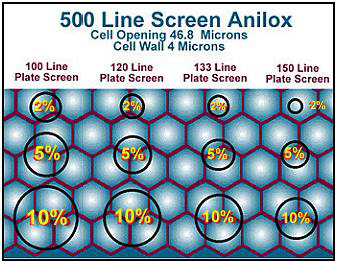
The reason to follow the above chartis simple. You do not want the dot on your printing plate to be smaller than the cell on your anilox roll. If that occurs, the dot can actually enter the anilox cell, picking up excess ink. This phenomena is referred to as “dot dipping” and can lead to very dirty printing situations.

The following models visually represent various line screen anilox rolls in relationship to various line screen printing plate dots. Notice that some of the printing plate dots are smaller than the anilox cells. In these situations, you will experience “dot dipping” and dirty printing. In other cases, you will notice that many anilox cells support a single printing plate dot. In extreme situations, this can lead to dot starvation and low densities on press.


Understanding the relationship of printing plate dots to anilox cells will help change your flexo printing process from an art to a science. By following the guidelines in this article, you should avoid the problems of dirty printing and print starvation, and save time and money in the process.

If you have further questions, please do not hesitate to e-mail technical solutions department, or call Harper at 800-438-3111 / 704-588-3371

The amount of ink that is transferred from a cell depends upon the carrying capacity of the cell or the cell’s volume. Anilox volume must be accurately measured and maintained and is THE primary controlling factor in flexo printing.

Impact on Quality Printing

Remember, you print with a wet and fluid film of ink and it is beneficial to print with the thinnest ink film possible. Therefore, you want to make sure your anilox volume, or cell carrying capacity, suits the specific printing needs of your operation.

anilox volume diagramThinner films of wet ink are easier to control, reduce dot gain, and increase graphic capability. If you are trying to print with excess volumes, you will have a hard time reaching the optimum flexographic process in your facility.

Why are thinner ink films important? Because dot gain is decreased with thinner ink films, simply because there is less ink to transfer from the printing plate dot.

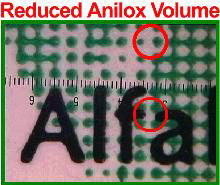
As shown in the photographs below, lower anilox volumes provide cleaner, sharper graphics, as opposed to the heavy print produced by the higher anilox volume below.

reduced anilox volume heavy anilox volume

Thinner Ink Films Effect:

  • Dot Gain/Tonal Range
  • Contrast/Fidelity
  • Trap and Press Speed
  • Ink Mileage

Thinner Ink Films Yield:

  • Predictable Dot Gain
  • Clean Printing
  • Smaller Dots
  • Open Reverses
  • Clean Type
  • Sharp Edges

However, you still need to achieve acceptable densities from your inks.

Therefore, you must evaluate the ink you are using. If you are not getting adequate color strength, you may need to re-think your current ink choice or talk to your ink supplier to see if they have a solution. Ink manufacturers have responded to the demand for higher pigment inks. They may cost a bit more in the beginning, but improved graphics will more than offset this cost. Also, because you are transferring less ink, handling less ink, and wasting less ink, you will be buying less ink.

Reduced VOC emissions are another benefit of using lower volume anilox rolls. It is the same concept: less ink gives off less VOC emissions. It is that simple. Line screen is chosen in direct correlation to anilox volume. For example, an anilox volume of 3.2 BCMs, requires a line screen of approximately 500. If an anilox volume of 3.2 BCM was engraved at 1000 line screen, cells would be much too deep. In correlation, a 3.2 BCM anilox at 120 line screen anilox would result in cells being much too shallow.

With increased ink strength and lower anilox volumes, higher line screen anilox rolls can now be used. These higher line screen rolls give printers the opportunity to reach for higher graphics with finer vignettes, line and type, and process work. Following is a rough outline of printing applications matched with appropriate line screens and cell volumes:

Application Appropriate Anilox Line Screen Appropriate Anilox Volume
Heavy line and solids 180 – 330 9 – 4 BCMs
Line and type 200 – 400 8 – 3 BCMs
Vignettes 360 – 500 3.6 – 2.8 BCMs
Process 500 – 1200 2.8 – 0.9 BCMs

Most importantly, a printer must choose the best volume and line screen combination for their anilox roll to meet the needs of the specific job he or she is printing. One helpful tool for determining the line screen needed is a banded roll.


A banded roll contains actual bands of different line screen and volume combinations. A banded roll test helps determine the correct line screen and volume combination for printing the thinnest ink film possible and still delivering the color strength you need. Your Harper Technical Account Manager can help you run and interpret a banded roll test at your facility if you are interested.

Measuring Anilox Volume

measuring anilox volumeAnilox volumes are measured in BCMs (Billions of Cubic Microns). Keep in mind that we are dealing with very small measurements and that every micron is critical. How big is a micron? A human hair is approximately 70 microns in diameter.

At Harper, we measure our anilox rolls using Echotopography™. This measurement system uses reflected light to gather height information of microscopic surface patterns with accuracy as fine as 10 nanometers. This advanced technology allows Harper to maintain the tightest manufacturing tolerances in the industry.

With over one million dollars invested, we now bring Echotopography™ to you as our standard measurement system on every Echocel ET2000™ roll. You’ll experience the benefits in every Echocel ET2000™ roll, and at no additional cost.

The Echotopography™ measuring system provides the following benefits of other anilox measuring techniques:

  • Correlates to Press Performance
  • Standardized Volume Specifications
  • Precise Cell Volume Measurement
  • Repeatable Cell Volume Measurement
  • Non-Subjective Analysis
  • Reduced Measurement Error
  • Statistically Valid Measurement Process

Other common anilox cell measuring techniques include liquid volume measurement and microscopic measurement. Both of these techniques have inherent flaws.

Liquid Volume Measurement:

  • Does Not Address Print Quality
  • Does Not Address Cell Quality
  • Not Repeatable
  • Not Available At Set Up
  • Subjective Based On Technique

Microscope Measurement:

  • Developed for Mechanical Engravings
  • Based On Depth Measurement
  • Assumes A Particular Cell Shape
  • Wall & Opening Measurement
  • Theoretical Volume Calculation

Conclusion

Remember that anilox volume is THE Primary Controlling Factor In Flexo Printing, and it works in correlation to all other anilox properties. In addition to an understanding of anilox volume, you need a basic understanding of the line screen and cell geometry of your anilox rolls.

Knowledge of these three components will give you the ability to choose the anilox inventory best suited to your printing operation.

If you have further questions, please do not hesitate to e-mail our technical service department, or call Harper at 800-438-3111 / 704-588-3371.

Anilox line screen indicates the number of cells per linear inch on an anilox roll, and is a major component when specifying an anilox roll.

Anilox line screen

Line screen is chosen in direct correlation to anilox volume. For example, an anilox volume of 3.2 BCMs, requires a line screen of approximately 500. If an anilox volume of 3.2 BCM was engraved at 1000 line screen, cells would be much too deep. In correlation, a 3.2 BCM anilox at 120 line screen anilox would result in cells being much too shallow.

With increased ink strength and lower anilox volumes, higher line screen anilox rolls can now be used. These higher line screen rolls give printers the opportunity to reach for higher graphics with finer vignettes, line and type, and process work. The following is a rough outline of printing applications matched with appropriate line screens and cell volumes:

Application Appropriate Anilox Line Screen Appropriate Anilox Volume
Heavy line and solids 180 – 330 9 – 4 BCMs
Line and type 200 – 400 8 – 3 BCMs
Vignettes 360 – 500 3.6 – 2.8 BCMs
Process 500 – 1200 2.8 – 0.9 BCMs

Impact on Graphic Quality as shown in the table above, different printing applications require different line screen counts. The reasoning behind this is that lower line screen anilox rolls typically have higher volumes and carry larger amounts of ink or thicker ink films. These thick ink films do not produce the graphic quality necessary for high-end process work. Therefore, a 330 line screen anilox roll will not be adequate when printing process flexo.

On the other hand, a high line screen anilox roll (800-1200) is not capable of laying down enough ink for a block solid job. The printer will not get enough density or coverage from such small cells. Most importantly, a printer must choose the best line screen for their anilox roll to meet the needs of the specific job he or she is printing. One helpful tool for determining the line screen needed is a banded roll.

A banded roll contains actual bands of different line screen and volume combinations. A banded roll test helps determine the correct line screen and volume combination for printing the thinnest ink film possible and still delivering the color strength you need. Your Harper Technical Account Manager can help you run and interpret a banded roll test at your facility if you are interested.

Banded roll contains samples of different anilox line screen

Surface Geometry

Other than random patterns, anilox cell angles include the 60° hex pattern, the 30° hex pattern, and the 45° diamond pattern.

anilox line screen surface geometry

Today, the 60° hex pattern is recommended for most flexo printing applications for the following reasons:

  • Cells can be nested more tightly together, allowing for approximately 15% more cells in a given area.
  • Post areas are eliminated due to the placement of the cells during laser engraving.
  • Cells can be more shallow while still releasing the same amount of ink because more cells fit into a square inch area.
  • Channeling is avoided (as compared to the 30°) because the straight side of the cell wall is not positioned horizontally.
  • The 60° hex pattern is most easily reproducible from a manufacturing standpoint. Therefore, you will see greater consistency from roll to roll.

45° and 30° patterns may be preferable in non-printing flexo applications (such as coatings, laminations, and specialty printing), but ordinarily are not recommended for general flexo printing applications.

Calculating the Number of Cells per Square Inch

There are two calculations for determining the number of cells per square inch of your anilox roll. One calculation is specifically for 45° cell patterns, and the other accounts for both 60° or 30° anilox configurations. Following are the calculations:

For 45° Cell Patterns:

Line Screen X Line Screen = # of Cells per Square Inch
Example: For a 500 Line Screen, 45° anilox roll:500 line screen X 500 line screen = 250,000 cells per sq. inch

For 60° and 30° Cell Patterns:

(Line Screen X Line Screen) X 1.15 = # of Cells per Square Inch
Example: For a 500 Line Screen 60° or 30° anilox roll: (500 line screen X 500 line screen) X 1.15= 287,500 cells per sq. inch

Conclusion

In today’s flexo marketplace, it is vital that you understand the impact of your anilox line screens and cell geometry.

In addition, you need a basic understanding of the carrying capacity of the cell or cell volume. Knowledge of these three components will give you the ability to choose the anilox inventory best suited to your printing operation. If you have further questions, please do not hesitate to e-mail our technical service department, or call Harper at 800-438-3111 / 704-588-3371